
The Confident Live TOOLKIT
Stop Procrastinating and Launch your Show!
STEAL MY STUFF
Get all my templates and resources that I use for my live shows and podcasts. Tried and tested by me and used by clients around the world.
Don't procrastinate - take the shortcut, create a content repurposing machine and go live with the Confident Live Toolkit.
VIP & VIP+ PACKAGES AVAILABLE
Get one-to-one coaching directly from me to really accelerate your progress.
Limited places are available (see below).
ARE YOU...
Wanting to launch a show, but haven't yet?
A recovering perfectionist and don't know where to start (or how to finish)?
HAVE YOU...
Already launched your show, but don't have a plan and really don't know where it's heading?
Already got a show but want to make it look more professional and help it grow?
Or maybe you...
- Know what you want to say, but struggle in front of the camera. You clam up and can’t think straight?
- Are not sure which tools or tech to use and how to put it all together?
THE CONFIDENT LIVE TOOLKIT
WHAT YOU GET

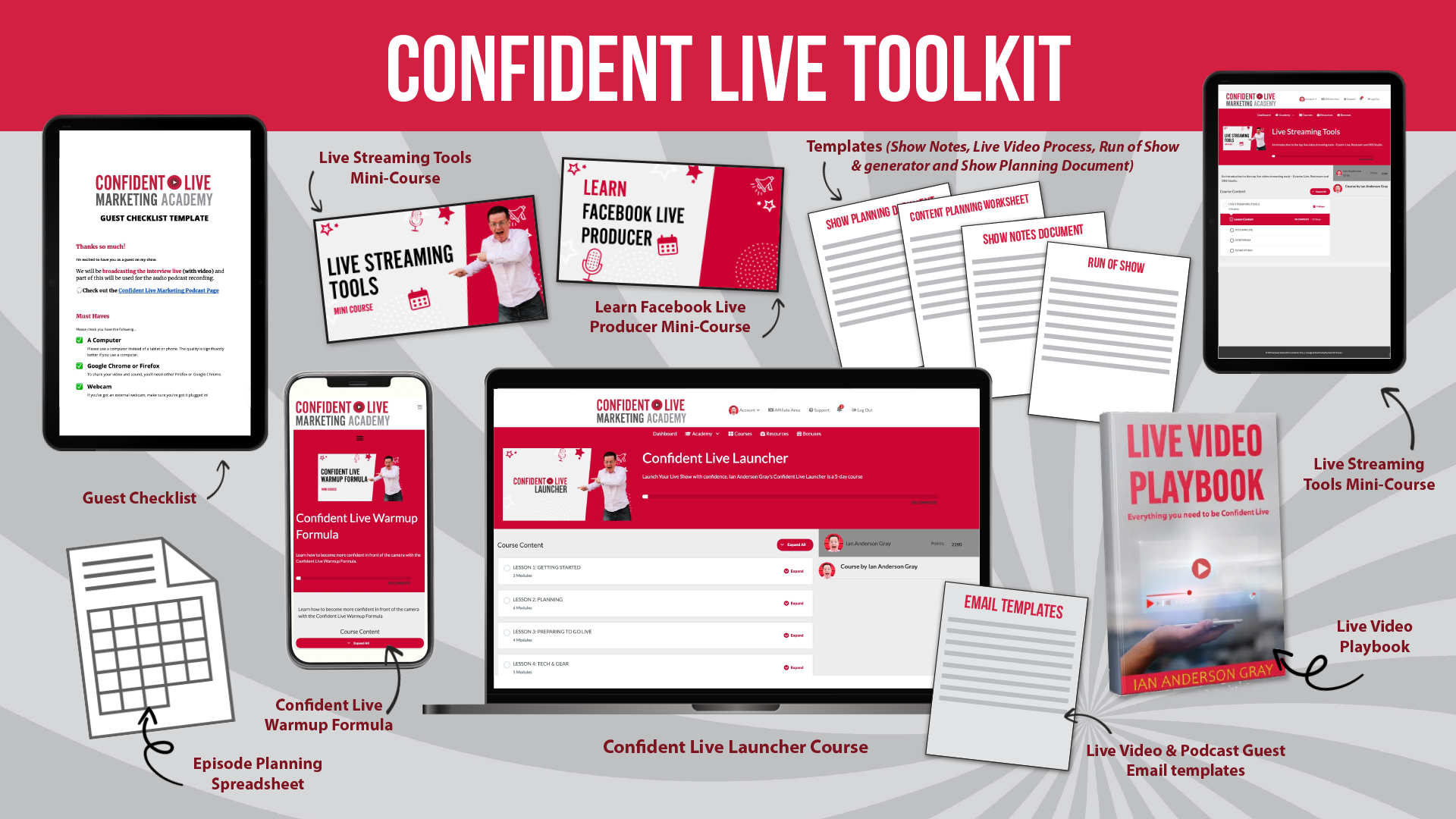
#1 Confident Live Launcher (Course)
Drip-fed over 5 days, the Confident Live Launcher is a video-led course focused on launching your live show or taking your existing show to the next level.
We cover the tools, processes and techniques to turn your live show into a content repurposing machine - so you can create podcasts, blog posts and more.
LESSON ONE: GETTING STARTED
What you're going to learn / Creating a content repurposing machine / What you need
LESSON 2: PLANNING
Planning / You / Who / Planning Document / Where & When / How
LESSON 3: PREPARING TO GO LIVE
Run of Show / Your 3 Audiences / Structure & Engagement / Practice
LESSON 4: TECH & GEAR
Gear - what you need / Computer vs smartphone / Smartphone gear / computer gear / Building your live video studio
LESSON 5: THE 5 PS OF LIVE VIDEO
Introduction / Planning/ Pre-promotion / Production / Post-promotion / Re-Purposing
#2 Live Streaming Tools Mini-Course

Learn how to use the top live video streaming tools from your computer including StreamYard, Restream and Ecamm Live. More coming soon!
#3 Facebook Live Producer Mini-Course

Take your Facebook Live to the next level with polls, questions and more. Facebook Live Producer can be a bit clunky and complicated, but with this mini-course, I make it easy!

#4 Confident Live Warmup Formula
Get more confident in front of the camera and communicate more effectively!
There are 8 short modules including:
Getting over the fear over live / Relaxing your body / Improving your posture / Breath Control / Pitch Interest (sound less boring) / Diction and Energy / Heightened Authenticity (You, but with more energy)
#5 Show Planning Document
#6 Content Planning Worksheet
#7 Episode Planning Spreadsheet
#8 Show notes template
#9 Live Video Content Process Template
#10 Run of Show Template
#11 Run of Show Generator (Beta)
#12 Guest Checklist
#13 Email Templates
#14 Live Video Playbook
A 135-page comprehensive guide on how to broadcast live confidently and professionally from your computer.
Includes
☑️ Top live video gear (cameras, microphones, lights, screens)
☑️ In-depth comparison and reviews on the best live video streaming tools

Led by Ian Anderson Gray.
He’s the founder of the Confident Live Marketing Academy and is the host of the Confident Live Marketing Podcast. He helps entrepreneurs to level up their impact, authority and profits by using live video confidently. He’s helped businesses and entrepreneurs around the world with camera confidence, live video tech and live video launches. He’s an international speaker, trainer, teacher and consultant.

FAQs
The Confident Live Launcher is drip-fed over 5 days. You don't have to go through the course in 5 days if you don't want to - you can take as long as you want. I will be sending you emails over the 5 days to encourage you, and you'll have all the templates and resources.
As you go through the launcher, you'll unlock the other courses. These are mini-courses which you can go through in your own time.
You'll always have access to the resources and the courses.
If you have purchased the VIP or VIP+ program, you will have some one-to-one calls with me. Exciting! Please note, that one-to-one calls are NOT included in the standard version of the Confident Live Toolkit - only the VIP and VIP+.
Shortly after you purchase the Toolkit, you'll receive an email with all the resources and a link to the Academy website. I'll be in touch to arrange the one-to-one calls with you. I recommend you go through the Launcher course first before we do the one-to-one calls - just so you get the most out of everything.
The one-to-one calls will be held over Zoom. I work with clients all around the world and will do my best to accommodate your schedule. Please bear in mind, that I am in the UK, and I won't be able to guarantee calls at the perfect time for you. Please be flexible!
This program is designed for people who have already gone live and want to accelerate their existing show.
Absolutely! The key to learning is by actually practising what you've learnt. This is vital if you are actually going to accelerate your Live show. As well as our community on Volley, we have a pop-up Facebook group that is dedicated to practising.
You'll have lifetime access to the training. The Facebook members' group will be available for 4 months, after which it will be archived. However, you will still be able to access the group in a read-only state after that. Future groups will not have this extended access to the Facebook group.
No. Although I highly recommend using Ecamm Live, I have a huge amount of experience with other tools. Alternatives to Ecamm Live include StreamYard, Restream and Wave.Video.
Although most students are Mac users, this course is platform agnostic. You'll be able to accelerate your lives whether you have a Mac or a PC. I cover the popular live video tools in this course.
Yes. Some of it. But if you earn more than $1 an hour it will be more cost effective to have the exact plan you need handed to you on a platter. And that’s without factoring in my personal mentoring and feedback which I usually charge out at $390 per hour. And you’ll have to make your own mistakes. I’ve been there… they’re painful! I don’t advise it when you have the option of a pain free shortcut!